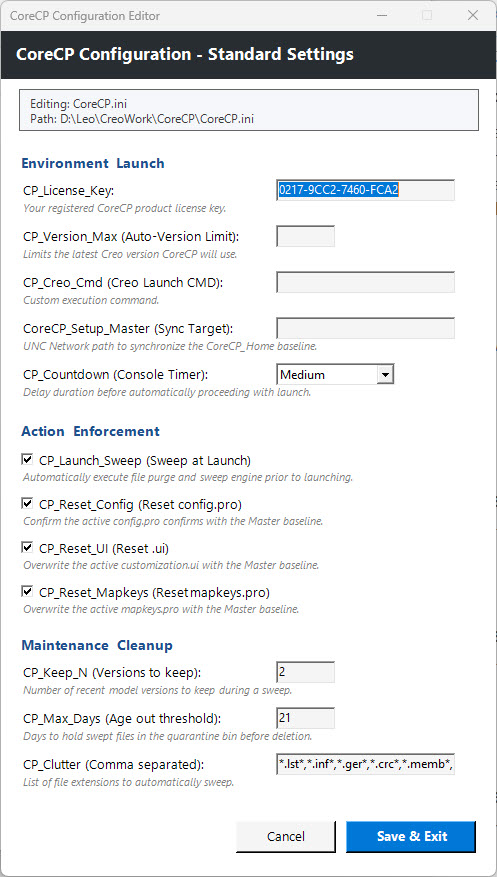
Enter your registered CoreCP license key to unlock full, unrestricted functionality. See Download Page
• CP_Version_Max
Limits CoreCP Creo Auto-Version selection. Leave blank for no limit, or enter a number (e.g. 8) to limit the Auto-Version selector.
• CP_Creo_Cmd
Defines the specific
executable or batch file used to launch Creo. Leave blank for parametric.exe, or provide a specific launch command (e.g. Creo.bat).
• CoreCP_Setup_Master
Define a network path here to act as your
central deployment server. When populated, CoreCP will automatically
synchronize the entire remote payload to the local CoreCP_Home folder upon
launch.
• CP_Countdown
Choose "Long", "Medium" or "Short", delay duration before automatically closing console. Use "Hold" to pause indefinitely, or "None" for instant execution.
• CP_Launch_Sweep (Yes, No)
If "Yes", automatically execute file purge and sweep engine prior to launch. Uncheck, "No", to skip launch time folder cleaning.
• CP_Reset_Config (Yes, No)
Ensure the active config.pro conforms to the Master baseline, or allow local config.pro variance.
• CP_Reset_UI (Yes, No)
Ensure the active creo_parametric_customization.ui conforms to the Master baseline, or allow local creo_parametric_customization.ui variance.
• CP_Reset_Mapkeys (Yes, No)
Ensure the active mapkey.pro conforms to the Master baseline, or allow local mapkey.pro variance.
• CP_Keep_N
Set the number of recent model versions to keep during a sweep. Set to 1 to keep only the newest file, or higher to preserve multiple versions.
• CP_Max_Days
Set days to hold swept files in the quarantine bin before deletion. Adjust based on disk space.
• CP_Clutter
Define the file extensions to automatically sweep. Use comma separation (e.g. *.lst*, *.inf*, *.ger*, *.crc*).
Instantly access the built-in Configuration Editor by simply holding the Shift key during launch.
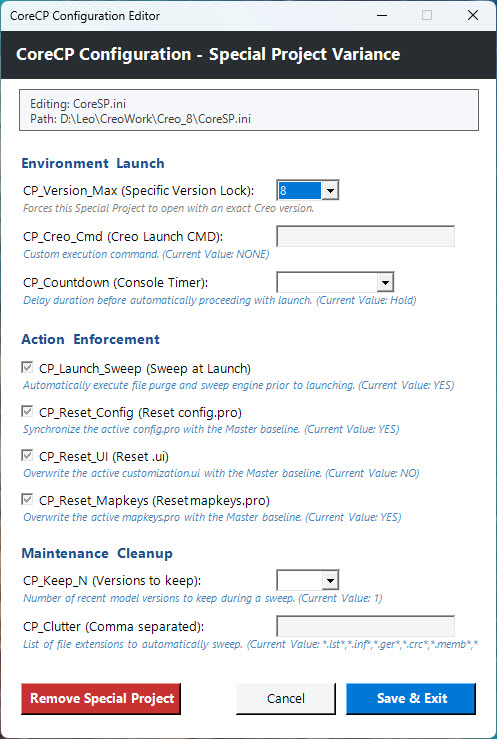
CoreCP Configuration Editor for Special Project is also accessed by holding the Shift key during launch.
Use a Special
Project when specific Creo versions, alternate Windchill logins, or any other isolated
settings are desired. Each Special Project has a
unique PTC_WF_ROOT assigned to the automatically created CoreSP_UserEnv sub-folder.